Two Worlds, One Team: How “Dev Mode” Differs from “Production Mode” and What It Means for Your People
If you’ve ever shipped software, you know there are really two companies living inside one:
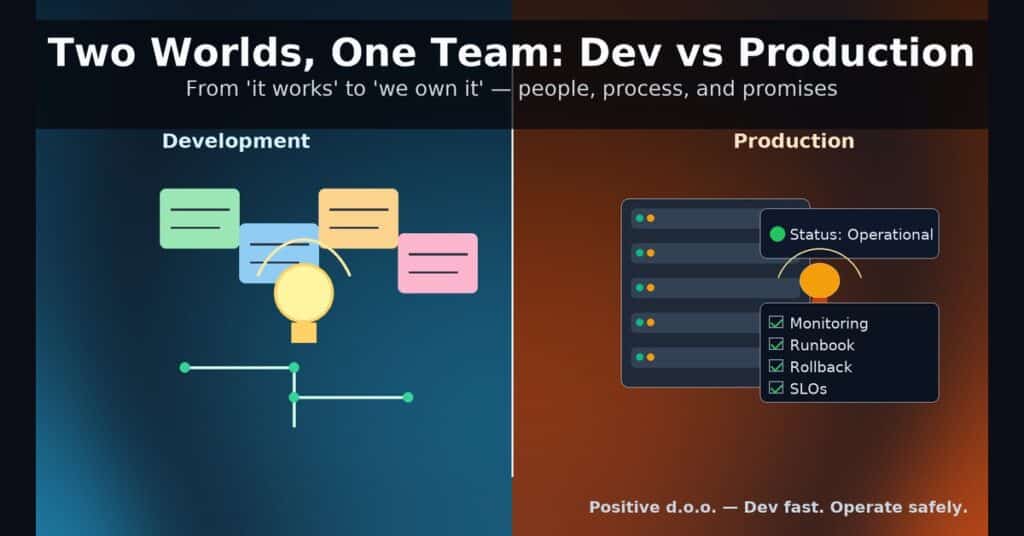
- The development side: exploratory, flexible scope, changing assumptions, lower immediate risk.
- The production side: contractual obligations, real users, uptime SLOs, financial consequences.
Both are essential. But the shift from “let’s build it” to “we’re on the hook for it” changes everything, how people feel, what “done” means, how managers lead, and how the company absorbs risk. This post breaks down the differences, focusing on the human impact, especially on the manager who has to hold both worlds together.
1) Risk Profile: Curiosity vs. Consequence
Development (R&D, prototypes, pilots)
- Primary risk: learning rate is too slow.
- Failure cost: local: throw-away code, adjust scope.
- Emotion on the team: playful pressure; “we can always refactor.”
Production (live users, client contracts)
- Primary risk: breach of trust (users, clients, revenues).
- Failure cost: global: incidents, churn, penalties, reputational damage.
- Emotion on the team: heavier responsibility; on-call anxiety is real.
Manager’s job shift: from optimizing exploration to reducing blast radius. You can accept messy experiments in dev; in prod, you design for graceful failure.
2) Definition of Done: Working vs. Supported
Development
- “Done” = a feature works for happy paths.
- Documentation can lag; tests focus on basic correctness.
- Rewrites are common; trade-offs are temporary.
Production
- “Done” = operationalized: monitoring, alerts, runbooks, SLOs, rollback plans, privacy/security checks, support training, billing edge cases.
- Docs must be current; tests cover regressions and misuse.
Manager’s job shift: enforce operational gates. No feature is done until it’s discoverable, observable, and supportable.
3) Time & Stress: Deadlines vs. Response Times
Development
- Deadlines are negotiable; sequencing can change.
- Stress spikes around demos, not 3 a.m.
Production
- Time is driven by response (incidents, escalations, SLAs).
- Stress is uneven—quiet weeks punctuated by intense hours.
Manager’s job shift: protect sleep and sustainability. Normalize post-incident cooldowns, rotate on-call fairly, and budget time for toil reduction.
4) Communication: Internal Updates vs. External Accountability
Development
- Stakeholders are mainly internal; expectations can flex.
- “We learned X; next we’ll try Y” is acceptable.
Production
- Stakeholders include clients, CS, legal, finance.
- Communication must be clear, timely, and promise-aware. “ETA with confidence” matters.
Manager’s job shift: become the translation layer—turn technical reality into business clarity without over-promising.
5) Quality Bar: Cleverness vs. Predictability
Development
- Optimize for speed and optionality.
- Clever hacks can unblock learning.
Production
- Optimize for predictability and mean time to recovery (MTTR).
- Boring, well-instrumented solutions win.
Manager’s job shift: reward boring excellence: observability added, flaky tests killed, edge cases handled.
6) Impact on Roles (People First)
Engineers
- Dev: autonomy, creative flow, fewer constraints.
- Prod: sharper boundaries, on-call, incident playbooks, change reviews.
QA/Testing
- Dev: exploratory testing, quick feedback.
- Prod: risk-based testing, regression suites, compliance checks, release gates.
Design/PM
- Dev: discovery, prototypes, fast iterations.
- Prod: roadmap paced by support load, SLA obligations, change management.
DevOps/SRE
- Dev: enabling environments, CI/CD speed.
- Prod: capacity planning, SLOs, incident command, cost/perf tuning.
Data/ML
- Dev: experimentation, offline metrics.
- Prod: data contracts, drift monitoring, rollback strategies, PII governance.
Manager’s job: calibrate expectations per role, avoid dumping production stress on the same few people, make operational work visible and valued.
7) The Manager’s Center of Gravity
When production begins, the manager’s role tilts from coaching builders to owning outcomes.
Your new essentials:
- Operating Agreement (shared, visible)
- Change windows, review levels, rollout/rollback policy.
- Who can hotfix? Who can page whom? What is “P1” vs “P2”?
- Risk Register & Escalation Tree
- Top 10 known risks, owners, mitigations, comms templates.
- One-click escalation paths (names, phones, backups).
- SLOs & Error Budgets
- Define “good enough” reliability; pause feature releases when the budget is burned.
- Incident Rituals
- Blameless postmortems with actionable follow-ups (limit to 3–5 items).
- Fix it and fix how you missed it (tests, alerts, playbooks).
- Sustainable Rotations
- On-call size & cadence that people can live with.
- Comp days / on-call pay; quarterly rotation opt-in/opt-out.
- Truthful Dashboards
- 5–7 metrics you’ll actually look at weekly: uptime/SLO, MTTR, change fail rate, support volume, cost-to-serve, NPS/CSAT, release frequency.
- Psychological Safety
- Make it safe to raise risk early. Celebrate “near-miss” reporting as much as hero fixes.
8) Money, Trust, and the Wider Company
Production connects technology to cash flow.
- Downtime → refunds/penalties.
- Incidents → support costs and churn.
- Scope creep → margin risk.
Manager’s connective tissue: finance (cost-to-serve), sales (promise discipline), legal (SLAs & data handling), customer success (feedback loop), security (posture & audits). You’re not just shipping features; you’re protecting brand trust.
9) The “Dev → Prod” Launch Playbook (Minimal but Mighty)
- Freeze the definition of done
- Monitoring, alerts, dashboards, runbook, rollback, security check, support FAQ.
- Dark launch & guardrails
- Ship behind flags; ramp 1%→5%→20% with SLO watch.
- Pre-approved rollback in 1 click.
- Game Day (rehearsal)
- Trigger a synthetic incident; practice page, triage, comms, and rollback.
- Comms kit
- Internal: status page + Slack templates.
- External: maintenance window notice, incident update copy.
- Post-launch budget
- Reserve 20–30% of first sprint for fixes, docs, support enablement.
10) Red Flags Managers Shouldn’t Ignore
- “We can monitor later.” (You won’t.)
- Release notes say “minor change” but the diff is huge.
- One engineer knows the subsystem; others avoid it.
- Alarms that nobody reads. Tickets that never close.
- Stakeholders learn about changes from customers.
11) What This Means for Your Team
- Developers: You’re not just writing code; you’re building a service. Ask, “How will this fail, and how will we know?”
- Leads: Review for operability as much as architecture. Praise proactive risk calls.
- Managers: Build the runway: agreements, rituals, and metrics, so people can land the plane safely and keep innovating.
Closing Thought
How do we at Positive doo handle it? Development is where possibilities bloom; production is where promises live. Great teams honor both. If you’re the manager in the middle, your craft is turning creative energy into dependable systems without burning out the people who make them. That means raising the quality bar and the humanity bar: better gates, better guardrails, better sleep.
Ship boldly. Support kindly. And remember: nothing is “done” until it’s safe to own.
Share